
How to Activate 5G in Pakistan: Jazz, Zong, Ufone

5G has been live in Pakistan since March 2026, and switching it on is usually a two-minute job in your phone’s settings — not a trip to a franchise and not a new SIM. If your phone shows 4G where your friend’s shows 5G, the difference is almost always one of four things: the phone, the SIM, the setting, or the street you are standing on. This guide walks through all four, with the exact steps for Android and iPhone and what Jazz, Zong and Ufone each need.
As of 23 October 2026, Pakistan has 1,782 live 5G sites across 24 cities — Jazz with 1,015, Zong with 640 and Ufone with 127, according to figures shared by IT Minister Shaza Fatima Khawaja and reported by Business Recorder. That sounds like a lot, but coverage is still pocketed: a 5G tower on one road does not mean the next street has it. So before changing anything, run the four checks below.
Before You Start: The 4 Things 5G Needs in Pakistan
1. A 5G phone with the right band. Your phone must support 5G on band n78 (3500 MHz), the main band used in Pakistan. Bands n41 and n28 help too. If you are not sure, check whether your phone supports the right 5G bands first — a 4G-only phone will never show 5G, no matter what you change in settings.
2. A PTA-approved phone. A non-PTA or patched phone can lose mobile service entirely, and 5G will not work on it. Send your IMEI by SMS to 8484 or check it on the DIRBS portal before you spend time on settings. Dial *#06# to see your IMEI.
3. 5G coverage where you are. 5G is live in 24 cities, but only in selected areas — usually commercial districts and dense neighbourhoods first. Check your operator’s coverage map in its app (Jazz World or My Zong) before assuming something is wrong with your phone.
4. The latest software. Some brands only switch on 5G support through a software update after the network approves the device. Install any pending system update, and on iPhone also accept any carrier-settings update prompt.
One thing you do not need is a new SIM. The PTA, Jazz and Zong have all confirmed that your existing 4G SIM already works on 5G — there is no separate “5G SIM” to buy. Only very old 3G-era SIMs need a replacement, which is free or cheap at a franchise. Reported prices for a brand-new 4G SIM are around PKR 350–450 depending on the operator and city, but you only need one if you are buying a new connection or replacing a damaged SIM.
How to Turn On 5G on Android
On most Android phones the switch is in the same place, though the exact menu names change by brand. Open Settings, go to Connections or Mobile Network, tap Mobile Networks or SIM & Network, then open Network Mode or Preferred Network Type and select the option that includes 5G — usually written as 5G/LTE/3G/2G (Auto) or 5G/4G/3G/2G. Pick the “Auto” option if you see one: it lets the phone fall back to 4G where 5G is weak, which also saves battery.
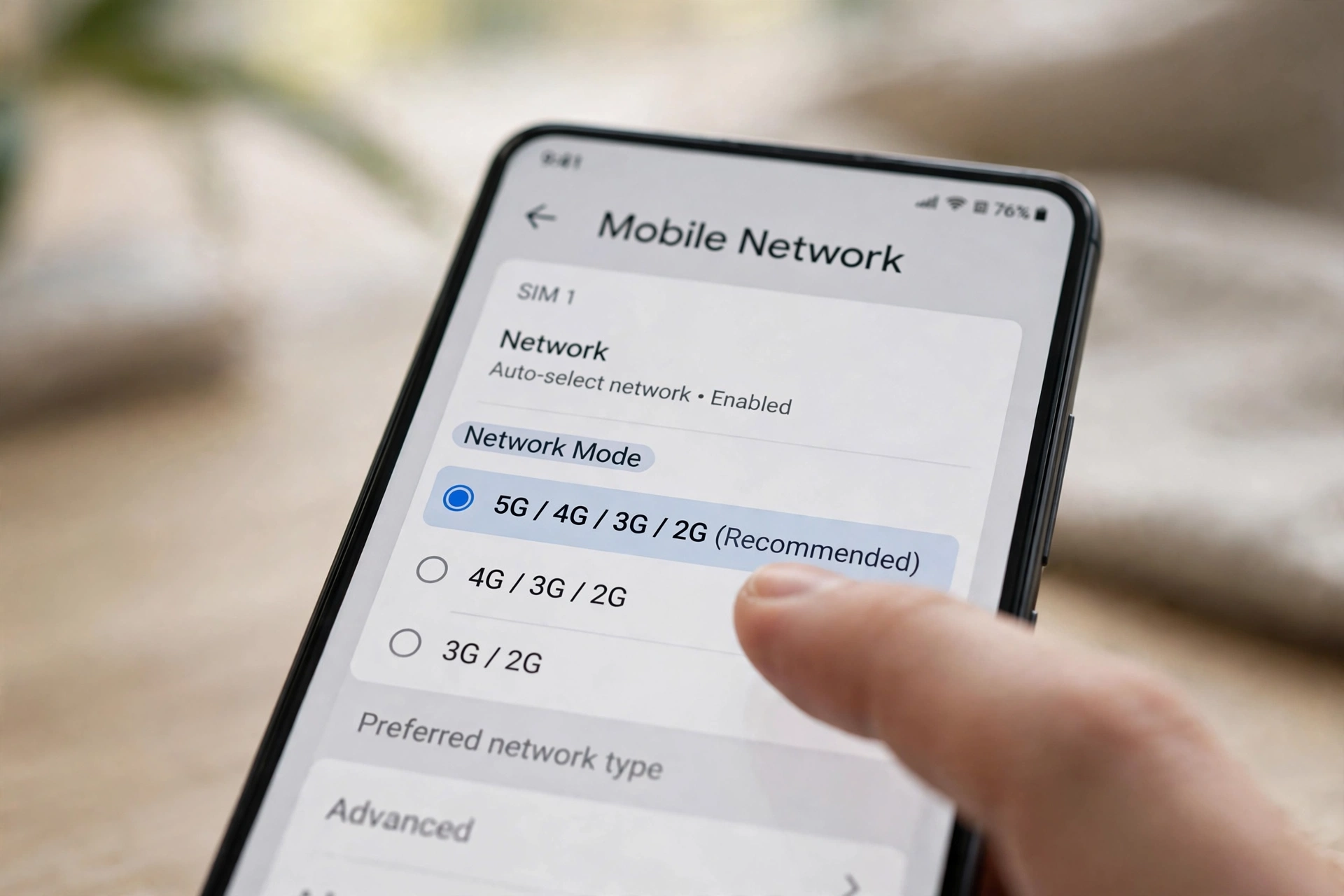
Samsung: Settings > Connections > Mobile Networks > Network Mode > 5G/LTE/3G/2G. On Galaxy A and S series phones this is the only step needed — the phone connects automatically inside a 5G area.
Xiaomi, Redmi and POCO: Settings > SIM cards & mobile networks > tap your SIM > Preferred network type > Prefer 5G. On HyperOS the same option may sit under Settings > Mobile Networks.
vivo, OPPO and realme: Settings > Mobile Network (or SIM card & mobile data) > tap your SIM > Preferred network type > 5G/4G/3G/2G or “5G preferred”.
Infinix and Tecno: Settings > Mobile Network > Preferred network type > 5G. On HiOS and XOS the menu is sometimes labelled “Network Mode” instead.
Dual-SIM tip: on many dual-SIM phones only slot 1 supports full 5G, so put the SIM you use for mobile data in slot 1, and make sure that same SIM is selected as the data SIM under Settings > SIM manager. After changing the setting, wait 30 seconds, toggle airplane mode on and off once, and look for the 5G icon in the status bar. If you want proof the phone is really on 5G, dial *#*#4636#*#* and check the network type under Phone Information.
How to Turn On 5G on iPhone
You need an iPhone 12 or newer — older iPhones do not have 5G hardware. Go to Settings > Mobile Service (or Cellular) > Mobile Data Options > Voice & Data, and choose 5G Auto. This is the setting Apple recommends: the phone uses 5G when it genuinely improves what you are doing and drops back to 4G the rest of the time, which protects battery life.
Choose 5G On only if you want the phone to stay on 5G whenever it is available — it is faster in a strong 5G area but drains the battery quicker. If you do not see a 5G option at all, check three things: your iPhone is updated to the latest iOS, your carrier settings are up to date (Settings > General > About will prompt you if an update is waiting), and your line is on Jazz or Zong in a live 5G area. A 5G icon in the status bar confirms you are connected; if the icon appears but pages load slowly, you are probably on the edge of a 5G site and 4G would actually be faster there.
Jazz, Zong and Ufone: What Each Network Needs
The settings above are the same on every network. What differs is the operator’s rollout — and one operator still has not switched 5G on for ordinary customers.
Jazz 5G: Jazz launched commercial 5G in March 2026 and now runs the largest 5G footprint in the country with 1,015 sites as of October 2026. It leads in Karachi, Lahore, Faisalabad and Multan. There is nothing extra to activate: your current 4G SIM and your current data bundle work on 5G. Open the Jazz World app to check coverage in your area and to see 5G bundles if you want one — but no separate 5G package is required to use the network, and the PTA has said current bundles should keep working on 5G in the initial phase.
Zong 5G: Zong was the first operator to launch commercial 5G in Pakistan on 19 March 2026, starting in 16 cities including Islamabad, Rawalpindi, Karachi, Lahore, Peshawar and Quetta. It now has 640 sites, and iannounced in August 2026a programme to upgrade more than 1,000 sites to 5G during the year. Zong has a stronger presence in Peshawar, Quetta, Sheikhupura and Sialkot. Activation is the same story: your 4G SIM works, your bundle works. Use the My Zong app to check coverage and subscribe to a bundle, or dial *6464# for the package menu. For detail on the operator’s plans, see our Zong 5G coverage and packages guide.
Ufone 5G: Ufone holds a 5G licence from the March 2026 auction and has deployed 127 sites, but as of late October 2026 it had not announced a commercial consumer 5G launch — so most Ufone users still cannot switch 5G on, even in cities where sites exist. Some aggregator guides list Ufone 5G packages, which conflicts with the launch status, so treat those with caution and check the My Ufone app for the latest position before paying for anything labelled 5G. Onic, which runs on Ufone’s network, follows Ufone’s timetable. Telenor Pakistan was not part of the March 2026 spectrum award at all, so Telenor lines are 4G-only for now; note that Telenor Pakistan merged into Ufone’s parent company PTML in July 2026.
| Operator | 5G status (Nov 2026) | Sites (Oct 2026) | What you need to do |
|---|---|---|---|
| Jazz | Live since Mar 2026 | 1,015 | Turn on 5G in settings; check Jazz World app for coverage |
| Zong | Live since 19 Mar 2026 | 640 | Turn on 5G in settings; My Zong app or *6464# for bundles |
| Ufone | Licensed; consumer launch not yet announced | 127 | Check My Ufone app for launch status; no activation yet |
| Telenor | 4G only | — | Nothing to activate; needs a network move for 5G |
Where 5G Actually Works in Pakistan Right Now
Pakistan’s 5G footprint covers 24 cities, but the towers are concentrated in the big ones. Karachi has the most sites at 385, followed by Lahore with 373 and Islamabad with 276. Faisalabad has 144, Peshawar 122, Rawalpindi 108, Multan 103, Sialkot 87, Quetta 65 and Sheikhupura 55. The remaining cities — Gujranwala, Hyderabad, Abbottabad, Attock, Jhelum, Kasur, Kohat, Mardan, Rahim Yar Khan, Sahiwal, Sukkur, Swabi, Chitral and Gujrat — share the rest. If you live in one of these cities, 5G is probably available in the busiest areas, not across the whole city, and indoor coverage is weaker than outdoor because the main 5G band (n78, 3500 MHz) does not pass through walls as well as 4G.
If you are buying a phone specifically for 5G, you do not need a flagship. The cheapest locally available 5G handset costs around PKR 36,000, according to Business Recorder in October 2026. Sensible 5G-ready picks already on sale in Pakistan include the Tecno Pova Curve 2 5G at PKR 99,999, the Vivo V60 at PKR 149,999 and the Samsung Galaxy A57 at PKR 174,999 — all three support band n78 and are PTA approved on official stock. If you are choosing between networks as well as phones, our best mobile network in Pakistan comparison covers speeds and coverage across all four operators.
5G Not Showing? Fixes That Work
Work through this list in order — most 5G problems are fixed by the first three steps.
1. Restart and re-toggle. Restart the phone, then turn airplane mode on for 10 seconds and off again. This forces a fresh network registration and fixes most “stuck on 4G” cases.
2. Check the setting again. Open the network mode menu and confirm 5G is actually selected — software updates and SIM swaps can reset it to 4G-only. On dual-SIM phones, confirm the right SIM is set as the data SIM and is in slot 1.
3. Move and test. Step outside or near a window and wait a minute. 5G on band n78 is weaker indoors, and a basement or a concrete building can hide it completely. If the 5G icon appears outdoors but not at home, the problem is coverage, not your phone.
4. Update everything. Install the latest system update and any carrier-settings update. Some phones only got 5G support for Pakistani networks in an update months after launch.
5. Verify PTA status. SMS your IMEI to 8484. A non-PTA, patched or JV phone may work on 4G for a while and still never get 5G — and it can be blocked entirely. Do not pay anyone who promises to “activate 5G” on a non-PTA phone; there is no such service.
6. Test with another phone. If a friend’s 5G phone on the same network shows 5G in the same spot and yours does not, your phone or SIM is the problem — try the SIM in their phone to separate the two. If no phone shows 5G there, the area simply has no coverage yet, and no setting will change that.
Frequently Asked Questions
Do I need a new SIM for 5G in Pakistan?
No. Your existing 4G SIM works on 5G — the PTA, Jazz and Zong have all confirmed this. Only very old 3G SIMs need a replacement.
Do I need to buy a separate 5G package?
No, not to use 5G. Your current data bundle works on 5G in the initial phase. Operators do sell 5G bundles in their apps, so compare them in the Jazz World or My Zong app before paying extra.
Why does 5G keep disappearing indoors?
Pakistan’s main 5G band, n78 at 3500 MHz, is weaker through walls than 4G. Your phone falls back to 4G indoors and returns to 5G outdoors. This is normal, not a fault.
Does 5G use more battery and data?
5G itself does not eat data — you use data at the speed you choose to stream or download. It does use more battery when the signal is weak, which is why “5G Auto” on iPhone and the Auto network mode on Android are the sensible defaults.
Will 5G work on a non-PTA phone?
No. A phone that is not PTA approved cannot reliably use Pakistani networks at all, and 5G will not work on it. Verify the IMEI on 8484 before buying any phone, new or used. For more buying guides and mobile news, visit MobZilo.
3 Comments