
Check 5G Bands on Your Phone in Pakistan

Pakistan switched on commercial 5G on 20 March 2026, and eight months later the network reaches 24 cities. Yet many people with a “5G phone” in their hand still see only 4G on the status bar.
The reason is usually not the network. It is the bands.
A phone only connects to 5G if it supports the exact radio frequencies — called bands — that Pakistani operators use. This guide shows you how to check your phone’s 5G bands in about two minutes, how to check whether your area even has 5G, and what to do when everything looks right but 5G still will not appear.
Which 5G Bands Does Pakistan Use?
Pakistan’s 5G networks run on four bands, according to GSMArena’s Pakistan network-bands directory. The one that matters most is n78.
n78 (3500 MHz) is the main 5G band in Pakistan. Jazz, Zong and Ufone all use it for their main 5G coverage, and it is the band that delivers the fastest speeds — typically around 350 Mbps to 1.1 Gbps where coverage is good.
The other three bands play supporting roles. n41 (2500/2600 MHz) adds capacity in busy urban areas, with typical speeds of roughly 250 to 680 Mbps. n28 (700 MHz) travels much further and passes through walls better, so it helps with indoor and highway coverage, but at lower speeds of around 75 to 220 Mbps. n40 (2300 MHz) is the fourth band in Pakistan’s 5G mix.
So the short version is this: if your phone supports n78, it can in principle use 5G on any of the three networks. A phone that also supports n41 and n28 has the best chance of holding a 5G signal everywhere — fast speeds in city centres on n78, and a usable signal indoors or on the move on n28.
One warning before you buy: the same phone model can have different bands in different countries. A variant sold in the US or China may skip n78 entirely, even though the global version supports it. Always check the exact model number, not just the phone’s name.
How Do I Check Which 5G Bands My Phone Supports?
There are four reliable ways to do it. You only need one of them, and the first is the most dependable.
1. Check the official spec sheet. Go to Settings, then About phone, and write down the exact model number — including any letters at the end, such as SM-A566B or A3520. Then search for that model number on the manufacturer’s official website or on GSMArena, and look for the “5G bands” or “Network” section. You are looking for the letter “n” followed by a number: n78, n41, n28 and n40 are the ones that count in Pakistan.
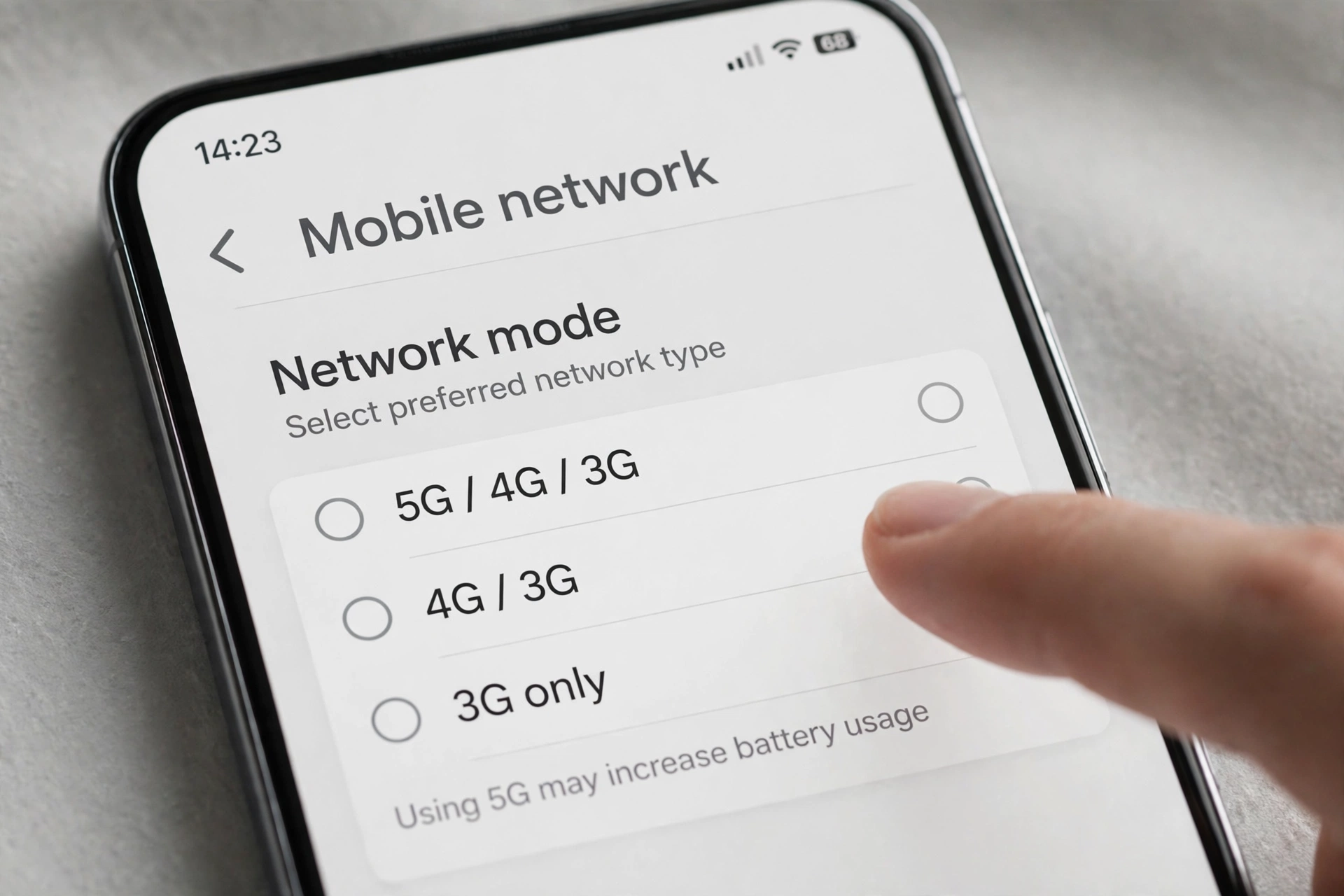
2. Check your network settings. On Android, go to Settings, then Network and Internet (or Connections), then Mobile network, then Preferred network type. If 5G appears in the list — usually as “5G/4G/3G/2G (automatic)” — your phone’s hardware supports 5G. If the list stops at 4G, the phone almost certainly does not. On iPhone, go to Settings, then Cellular (or Mobile Data), then Voice and Data. If you see “5G On” or “5G Auto”, the phone supports 5G. Every iPhone from the iPhone 12 onwards has 5G hardware.
3. Try the hidden testing menu (Android only). Open the phone dialer and type *#*#4636#*#*. On many Android phones this opens a testing menu where you can see phone information and the current network type. It does not work on every brand — Samsung phones, for example, often block it — so do not worry if nothing happens. It is a shortcut, not a requirement.
4. Use a network app to see the live band. Apps such as NetMonster or Network Signal Guru show the exact band your phone is connected to right now. This is the only method that tells you which band you are actually using, rather than which bands your phone supports in theory. It is most useful after you have already connected to 5G once and want to know whether you are on fast n78 or slower n28.
Do Popular Phones in Pakistan Support All the Bands?
Most 5G phones sold officially in Pakistan do, but it is worth checking the exact list before you pay. These three verified examples all support all four Pakistani 5G bands — n28, n40, n41 and n78.
The Samsung Galaxy A56 5G (international version) lists 5G bands 1, 3, 5, 7, 8, 20, 28, 38, 40, 41, 66, 77 and 78, according to Samsung’s official specifications and GSMArena. The Redmi Note 15 Pro 5G lists n1, n2, n3, n5, n7, n8, n12, n20, n26, n28, n38, n40, n41, n48, n66, n77 and n78 on Xiaomi’s official spec page. The iPhone 17 supports n28, n40, n41 and n78 across all its regional variants, according to GSMArena.
The pattern is clear: mid-range and flagship phones launched in the last two years almost always include n78. The risk sits with older phones, grey-market imports and cheap models that were built for a different region. If a phone’s spec sheet has no n78 at all, do not pay a 5G premium for it — in Pakistan it will behave like a 4G phone.
If you are shopping at the budget end, start with a phone that is officially sold here — the nubia Neo 3 5G is one example — and still run the band check above before paying.
How to Check 5G Coverage on Jazz, Zong and Ufone
A phone with the right bands still shows no 5G if there is no 5G tower near you. As of the IT minister’s update on 23 October 2026, Pakistan has 1,782 live 5G sites across 24 cities: Jazz has 1,015, Zong has 640 and Ufone has 127. Karachi leads with 385 sites, followed by Lahore with 373 and Islamabad with 276.
That sounds like a lot, but coverage is still pockets, not a blanket. Even inside a “5G city”, the signal usually covers business districts, campuses, hospitals and city centres first, with residential streets catching up later.
Before you blame your phone, check your operator’s coverage map and its 5G city list. Jazz, Zong and Ufone each publish coverage information on their websites and inside their apps. You can also check our city-by-city coverage guides, which list the site counts and the phones that work best in each city. If you are still choosing a network, our Best Mobile Network in Pakistan 2026 Compared guide puts Jazz, Zong, Ufone and Telenor side by side on speed and coverage.
Two things are worth knowing. First, your existing 4G SIM usually works for 5G — a 4G LTE USIM bought in the last few years connects to 5G automatically where the network uses non-standalone (NSA) mode, so you normally do not need a new SIM. Second, some operators ask you to enable 5G inside their app, so check your operator’s app settings if 5G is switched on in your phone but never appears.
Why Does My Phone Support 5G Bands but Show No 5G?
This is the most common complaint, and it usually has one of five causes. Work through them in order.
First, you may simply be outside 5G coverage. Step outside, move to a main road or a commercial area, and check again — 5G coverage can change from one street to the next.
Second, 5G may be switched off in your settings. On Android, set the preferred network type to 5G or automatic. On iPhone, set Voice and Data to 5G Auto or 5G On.
Third, your plan may not include 5G, or your operator may need you to activate it in their app. Check your package details and the operator’s app before assuming the phone is at fault.
Fourth, your phone may need a software update. Some phones only enable 5G in a region after a firmware update, so install any pending update and restart the phone.
Fifth, you may be on a variant that lacks n78. This is the hardest one to fix, because no setting can add a missing band. If the official spec sheet for your exact model number has no n78, the phone will never connect to Pakistan’s main 5G band, and you should confirm this before spending money on a 5G package.
One last check: restart the phone and toggle aeroplane mode on and off. It sounds too simple, but it forces the phone to re-scan for networks, and it fixes a surprising number of “no 5G” cases.
The Bottom Line
Checking 5G bands takes two minutes and can save you from buying the wrong phone or the wrong package. Find your exact model number, check its 5G band list on the manufacturer’s official page, and make sure n78 is on it. Then confirm that your city and your street actually have 5G coverage with your operator.
If n78 is there and coverage is there, 5G should work. If either one is missing, no setting on the phone will fix it — and knowing that before you spend money is the whole point.
Frequently Asked Questions
Which 5G band is most important in Pakistan?
n78 (3500 MHz). It is the main 5G band used by Jazz, Zong and Ufone, and it delivers the fastest speeds. A phone without n78 cannot use Pakistan’s main 5G coverage, even if it supports other 5G bands.
How can I check my phone’s 5G bands?
Find your exact model number in Settings, then About phone, and look it up on the manufacturer’s official specifications page or on GSMArena. The 5G band list shows entries such as n78, n41, n28 and n40. On Android you can also check Settings, then Mobile network, then Preferred network type — if 5G appears there, the hardware supports it.
Does my old 4G SIM work on 5G in Pakistan?
In most cases, yes. A 4G LTE USIM bought in the last few years connects to 5G automatically where the network uses non-standalone (NSA) mode. You normally do not need a new SIM, but if 5G never appears, ask your operator to confirm your SIM and plan are 5G-enabled.
Why does my 5G phone only show 4G?
Either there is no 5G coverage where you are, 5G is switched off in your settings, your plan does not include 5G, or your phone’s exact variant lacks the n78 band. Check the coverage map first, then your settings, then your plan, and finally your phone’s band list.
Do I need n41 and n28 as well as n78?
n78 alone is enough to connect to 5G in Pakistan. But n41 adds speed and capacity in busy areas, and n28 (700 MHz) reaches further indoors and along highways. A phone with n78, n41 and n28 has the best chance of holding a 5G signal everywhere.
For more mobile guides, phone prices and PTA explainers, visit MobZilo.

1 Comments